THE FINAL DISCONNECT: Why Samsung is Permanently Killing its Iconic Messages App
If you’ve been a loyal Samsung Galaxy user for the last decade, you’re likely familiar with the reliable, clean interface of the native Samsung Messages app. It has been a staple of the Android experience since the very first Galaxy S launched nearly 16 years ago. However, that era is officially coming to a crashing halt.
In a move that has sent shockwaves through the tech industry and caused “Samsung Messages” to trend across the United States this week, Samsung has issued a definitive “End of Service Announcement.” If you haven’t checked your notifications yet, you might want to sit down: the app you use to text your family, friends, and colleagues is being retired.
The July 2026 Deadline: The Countdown Has Begun
The news broke via an official update on Samsung’s US support portal, confirming that the Samsung Messages application will be discontinued in July 2026. While that might feel like a long time from now, the internal transition is already happening at a rapid pace.
Samsung isn’t just gently suggesting a new app; they are effectively cutting off the oxygen to their legacy platform. According to the announcement, once the deadline hits, the app will lose all standard functionality. You won’t be able to send RCS (Rich Communication Services) chats, standard SMS, or even multimedia MMS messages to your contacts.
Chime app users recently faced an outage causing login issues, transaction delays, and app errors. The company is working to fix the issue and restore services. For full details, visit: https://dailytechinsight.com/chime-outage-app-down-fix-status-2026/
The “Emergency Only” Catch
Perhaps the most alarming part of the announcement is what happens to the app after the July 2026 cutoff. Samsung has clarified that the app will not disappear from your phone immediately, but it will become a “ghost app.”
The Warning: “Once the Samsung Messages app is discontinued, sending messages via Samsung Messages on your phone will no longer be possible, except for emergency service numbers or emergency contacts defined in your device.”
This means if you don’t switch your default messaging platform before the summer of 2026, your phone will essentially be “locked out” of normal communication, leaving you only with the ability to call 911 or your designated emergency contacts.
Why Is Samsung Doing This? The “Google Takeover” Explained
You might be wondering why the world’s largest smartphone manufacturer would kill its own software. The answer is simple: Universal RCS.
For years, Android messaging has been a fragmented mess. Samsung had its version of RCS, Google had its own, and mobile carriers often had their own standards too. This led to “broken” group chats, blurry videos, and the infamous “green bubble” struggle when texting iPhone users.
By killing Samsung Messages, the company is finally surrendering to Google Messages. This move creates a unified Android front, ensuring that every Galaxy user gets the same high-end features that were previously exclusive to Google’s Pixel phones.
What you gain with the switch:
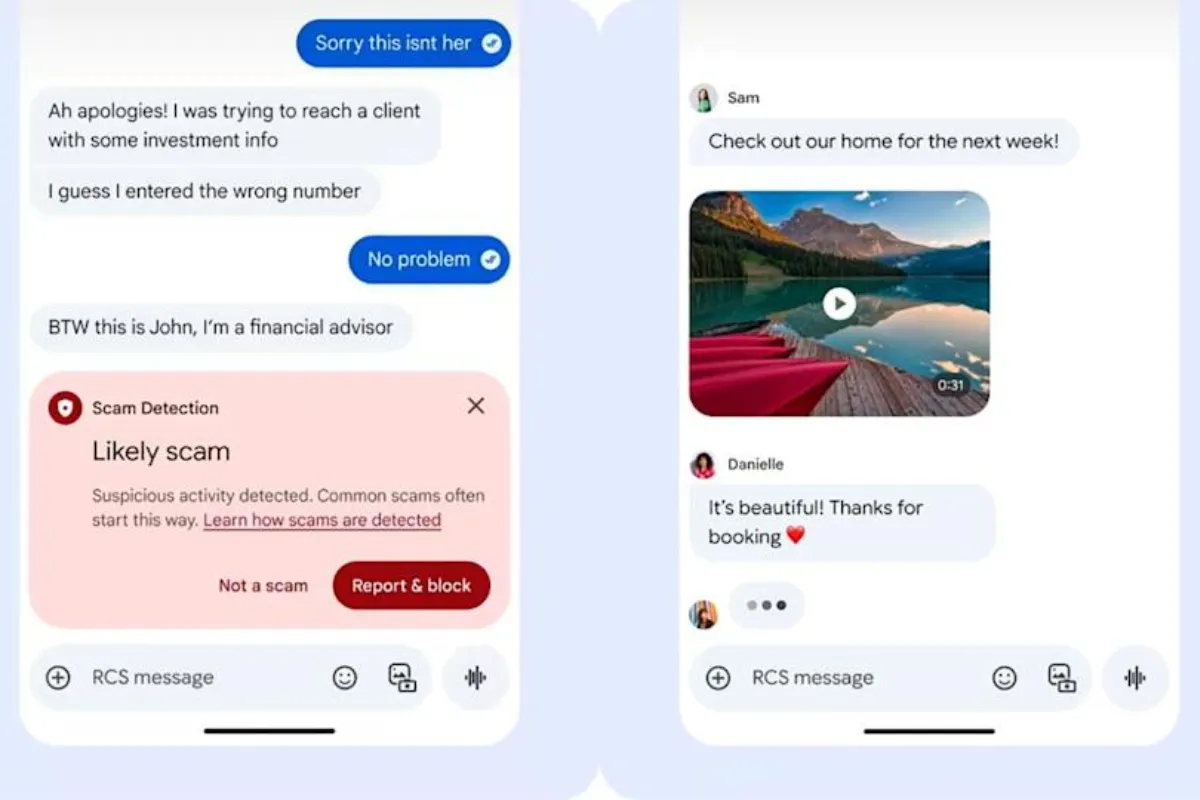
- AI-Powered Security: Google Messages uses advanced AI to detect and block scam texts before they even hit your inbox.
- Gemini Integration: You’ll have direct access to Google’s Gemini AI to help you rewrite texts, remix photos, and generate smart replies.
- Cross-Platform Parity: Now that Apple has finally adopted RCS with iOS 18 and beyond, the move to Google Messages ensures that Galaxy users can send high-quality media to iPhones without it looking like it was filmed on a potato.
Is Your Phone Already on the “Hit List”?
If you have recently purchased a Galaxy S26, Galaxy Z Fold 8, or Z Flip 8, you may have already noticed something strange: Samsung Messages is nowhere to be found.
Samsung has confirmed that for its newest flagship models, the app is no longer pre-installed. Furthermore, owners of these newer devices are blocked from downloading the app from the Galaxy Store. The era of choice is ending; for the newest tech, Google Messages is the only option out of the box.
For those on older devices like the Galaxy S21 through S25, you will likely start seeing persistent in-app banners and “Force Migration” pop-ups over the coming months. Samsung is making it very difficult to stay on the legacy platform, and for good reason—they don’t want millions of users left stranded when the July 2026 blackout hits.
The One Group That Is Safe (For Now)
There is a small silver lining for users who prefer the “old school” way of doing things. Samsung noted that users on Android 11 or lower will not be affected by this End of Service. If you are still rocking a Galaxy S9 or a Note 9, your app will keep working.
However, for everyone else on Android 12, 13, 14, 15, and the upcoming Android 16, the migration is mandatory.
The Tizen Watch Tragedy
The shutdown doesn’t just affect phones; it’s hitting the wrists of Galaxy Watch owners too. If you own an older Galaxy Watch that runs on Tizen OS (any model released before the Galaxy Watch 4), you are about to lose a major feature.
Once Samsung Messages is discontinued, these older watches will lose their full conversation history. While you will still be able to read and reply to incoming texts, you won’t be able to scroll back through your threads. For many, this is the final push needed to upgrade to a newer Wear OS-powered Galaxy Watch.
How to Switch Without Losing Your Chats
The biggest fear for any user is losing years of text history with loved ones. Thankfully, the transition is designed to be painless.
- Download/Open Google Messages: Most Galaxy phones already have it in the “Google” folder on the home screen.
- The “Default” Prompt: The first time you open it, a screen will appear saying, “To use Messages, make it your default SMS app.”
- Grant Permissions: Tap “Set as Default.” Google Messages will then spend a few minutes indexing your existing Samsung Messages database.
- Check Your Dock: On newer versions of Android, the Google Messages icon will automatically move to your bottom dock, replacing the old Samsung icon.
The Final Verdict: Is This a Good Move?
While many Galaxy purists are mourning the loss of the clean Samsung UI and features like “Message Categories,” the consensus among tech experts is that this is a necessary evil. By moving to a single, unified platform, Android users finally get a messaging experience that can rival iMessage in terms of security, speed, and AI capabilities.
The clock is ticking. You have until July 2026 to make peace with the change. Our advice? Switch today, get used to the new AI features, and don’t let your phone become a “read-only” brick when the deadline arrives.